Your class set, marked by morning.
Signed by you.
Margin, the Teacher Assistant, marks every paper in the set against your rubric and ties the reason for each mark to the line it came from.

Ils ont prendu l'autobus.“Item 4: auxiliary 'ont' is correct but the participle should be 'pris', not 'prendu'.”
FSF1D Core French · 17 / 20
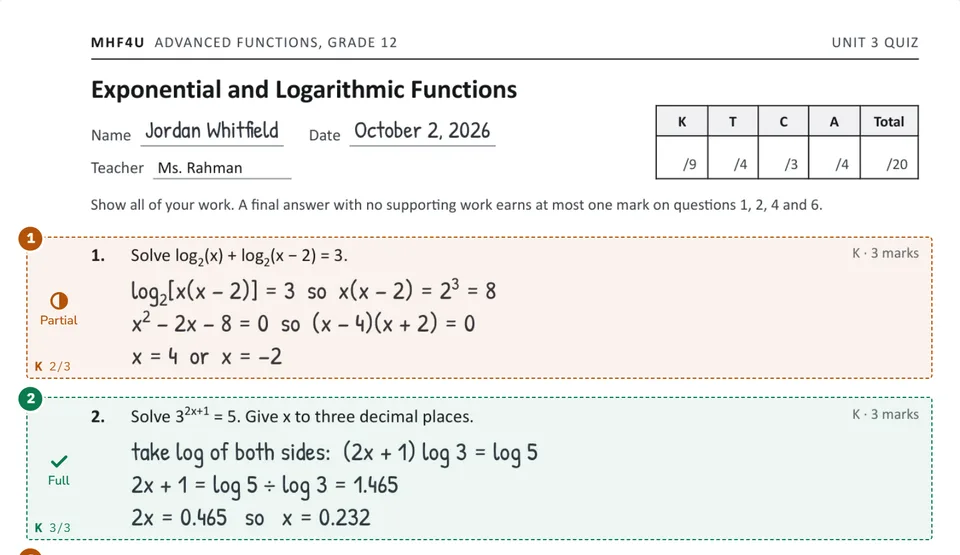
A mark on every question with the reason beside the working, and a summary naming the habit behind most of the lost marks.
MHF4U Advanced Functions · 16 / 20
“AI-assisted draft prepared by Elevate Grade Margin, reviewed and signed by a teacher.”
The footer on each marked page
Everything between the key and the hand-back.
What Margin does with a class set, in the order you meet it.
Your scheme, confirmed first
Margin reads the assessment question by question and proposes the marks across Knowledge, Thinking, Communication and Application. Nothing is marked against it until you have changed what you disagree with.
One link per class
Share the class link or its QR code, and each student photographs their pages and sends them in under their own name. Several photos become one submission, in page order.
Handwritten or typed
A photographed page sits beside an editable transcript, so a misread word is fixed before anything is scored. Tests, essays, labs and code are marked against your own key or rubric.
Review, then sign
Anything Margin flagged waits at the top of your review queue, and a mark you change stays changed. Every mark is a draft until you sign it, with your name and the time on the record.
One download back
Once the set is signed, every student’s annotated PDF comes down together in one ZIP, with the class summary as its own PDF. Hand them back the way you already return work.
Gradebook and report cards
Marks flow into the class gradebook, and a mark you typed by hand is never overwritten. Report cards are drafted onto your own template, prefilled from the gradebook, for you to review and sign.
Every mark arrives with its reason, on the line it is about.
- Knowledge, Thinking, Communication and Application when your course is marked that way.
- Written feedback drafted in a voice you can keep or rewrite.
- A class summary: the distribution, the common errors and where the group is weak.
Who sees a marked set, and when.
- You, the teacherEvery submission in your classes, the drafted marks with their reasoning, the review queue, the gradebook and the report card drafts. Nothing counts until you sign it.
- Your department head or administratorSigned in to the school’s workspace on Pro or School: the gradebook and report cards, the class summary for a set, and each signed mark with the approving teacher’s name and the time.
- Your studentsOnly their own classes and their own work. They see that their pages arrived, and nothing of the marking in the app. The marked pages reach them when you hand the set back.
Safe for a school, by construction.
Each school in its own environment
Every school runs isolated from every other. Cross-tenant access is denied and verified in automated testing.
Never used to train
Student work is sent only to generate the marks and the feedback, never for advertising, resale or training a model.
Hosted in Canada
The database and files live on cloud infrastructure in Canada. The AI step runs in the United States under commitments not to train on the data, and the school is the controller of it in writing.
The full terms are on the privacy policy and the data processing addendum.
What teachers ask before the first set.
Anything else, write to support@elevategrade.com.
How does starting free work?
Sign up with an email and no card, and Margin marks a limited number of papers free, with no time limit and everything the School size carries, essays included. The app shows how many are left. When they are used, choose a plan to keep marking: Starter, Pro or School, monthly or yearly, billed from that day. Essay marking is on Pro and School.
Does Margin decide the final mark?
No. Every mark is a draft until you sign it. Anything Margin flagged goes to the top of your review queue, you change what you disagree with, and the change sticks, with your name and the time on the record. Margin does not issue official marks or replace your judgment.
Can it read handwriting?
Yes. Students photograph their pages on a phone and send them through the class link. Each scan sits beside its transcript, you fix any misread word, and the marking runs from the corrected text.
Will it mark against my own rubric?
Yes. Upload your answer key or rubric and Margin proposes the scheme, question by question, across Knowledge, Thinking, Communication and Application. You confirm it before anything is marked, and every level box stays editable afterwards.
Does it fill in report cards?
It drafts them. Upload your report card form once and confirm how its fields map; Margin then makes one card per student for the term, prefilled from the gradebook. Comments are drafted from the student’s marks and your feedback, and nothing is sent to a student or a parent.
When do my students see their marks?
When you hand the set back. In the app a student sees only that their pages arrived. The whole set downloads as one ZIP of annotated PDFs, with the class summary as its own PDF, and you return them however you return work now.
Start on your own papers, free.
Starting is free: sign up with an email, no card needed, and Margin marks a limited number of papers free. After that, choose a plan to keep marking. Or get in touch to see it on your own course.